

How prompt templates creation works
A prompt template starts as a normal chat interaction. When a response is reviewed and confirmed as useful, it can be converted into a reusable template. This conversion is manual. An admin must explicitly enable the Parameterized toggle to turn the reviewed response into a prompt template. After a template is created, WisdomAI automatically organizes it. The system assigns the template to a Topic, which is simply a category used to group similar templates together. These topics are displayed as cards on the domain chat page, helping users discover relevant prompts.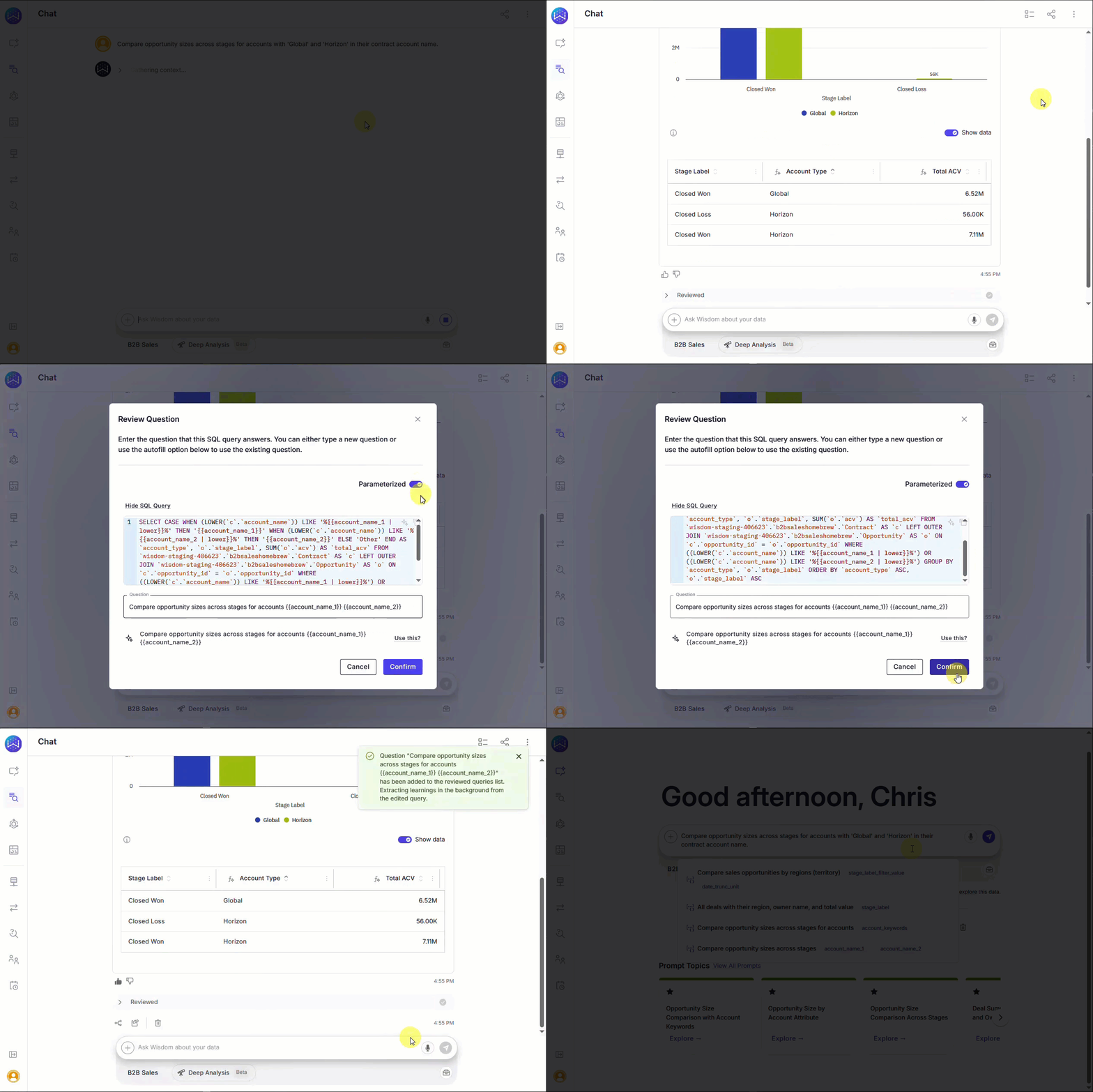
Autocomplete
Autocomplete uses existing prompt templates to suggest relevant queries as users type. It is domain-specific, meaning suggestions are generated only from prompts created within the current domain. When a user starts typing in the main chat window, WisdomAI searches the Prompt Gallery (if available) and displays matching prompts as clickable autocomplete suggestions.Next steps
Advanced Data Modeling
Define relationships and context in your data to enable more powerful analysis.
Provide Feedback to the System
Learn how to rate answers and provide corrections to improve the system’s accuracy.
Understand Domains
Manage and customize your data domains to refine context and improve query results.